Dental clinic software with a ready-made dental record
Medical Solutions is dental practice software that runs in the browser, for private dental clinics in Albania and Kosovo. Its dental patient record comes ready to use: the questions a dentist asks at the first visit, a tooth chart to mark findings on, photos, X-rays, informed consent and a record of treatments.
Choose Stomatologji / Dental when you register the clinic, and the dental template is waiting the first time you sign in. Use it as it stands, or change it to suit the way you work.
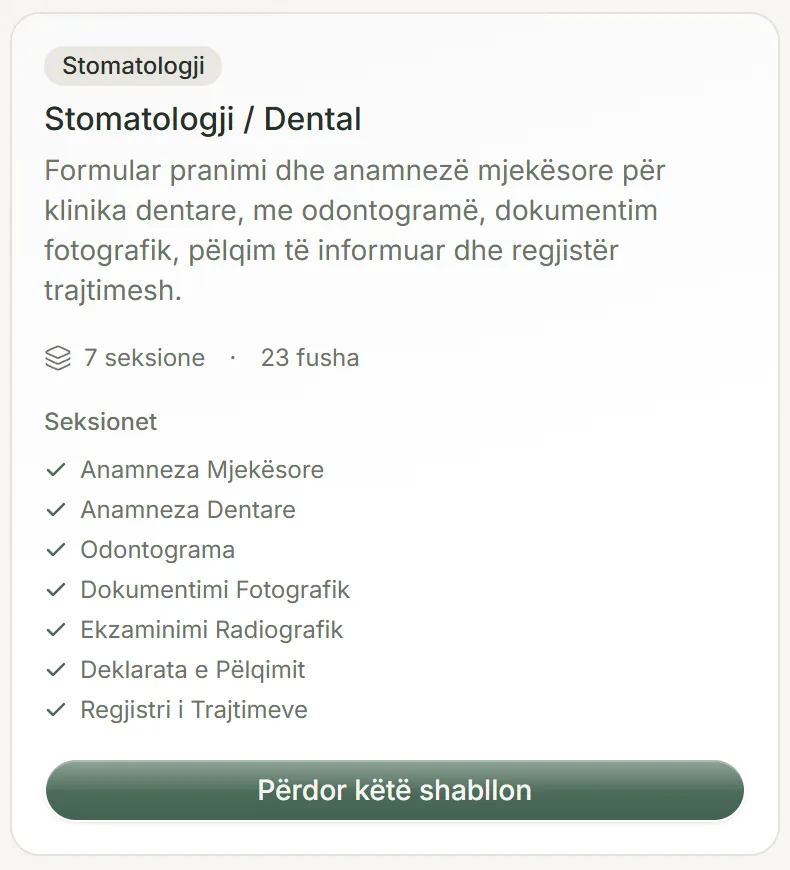
What the dental record holds
The template has seven sections, in the order a visit runs. Every record also carries the patient's basic details, such as name, date of birth and contact details, which are typed once and never asked again inside the form.
- Medical history: allergies, heart disease or high blood pressure, diabetes, hepatitis or HIV, smoking, bleeding or clotting problems, prescription medicines, and pregnancy or breastfeeding.
- Dental history: the reason for today's visit, the last visit to a dentist, pain or bleeding gums, and fear of dental treatment.
- A tooth chart in the FDI numbering system, which the dentist draws findings on.
- Clinical photography: a photo before treatment and one after, each with its own date.
- Radiographic examination: whether the patient has had or brought X-rays, with the date and the type (periapical, panoramic, CBCT or bitewing).
- Informed consent: a ready-written statement the clinic can edit, signed by the patient and the dentist.
- Record of treatments: one row per treatment, with the tooth number, diagnosis, treatment and date.
A tooth chart the dentist draws on
The chart is the standard FDI diagram of the permanent and the primary teeth. The dentist draws what they see straight onto it, with a pen in four colours and three thicknesses, an eraser and an undo button.
The drawing is saved apart from the diagram, so it can be opened and corrected at the next visit without spoiling the chart underneath, and the record's PDF prints the diagram with the drawing on it.
It is a free drawing, not a system that stores a status for each tooth. Work on a single tooth goes in the record of treatments, where the tooth number has a column of its own.
Allergies and pregnancy stay in view
The allergy and pregnancy questions are marked as safety-critical in the template. When a patient answers yes, the answer shows at the top of the record on screen and in a box of its own on the first page of the PDF, so nobody reads past it.
You can mark any other yes or no question the same way, for example whether the patient takes a blood thinner.
The pregnancy question does not appear on a male patient's record. The X-ray section closes itself when the patient says they have had no X-rays, so nobody has to type a date for a scan that does not exist.
Photos, X-rays and CBCT scans
Clinical photos and X-ray images go straight into the record's fields. They stay private: to open one, you have to be signed in to your clinic's account.
A DICOM study from a CBCT or panoramic machine often runs to hundreds of megabytes, so it is not uploaded. You keep it where the machine's software saved it, or on Google Drive, and add the link to the patient's record with a name and a short note. The software does not display the scan itself: the link opens it where it is stored.
Patients who come from abroad
If your clinic treats patients who travel from abroad for dental care, as in dental tourism, their record can print in Albanian with a second language beside it: English, Italian, French or Spanish. The dental template arrives with its wording in all four, and the clinic can review and change any of it.
Treatment quotes print in five languages, with prices in lek, euro or dollars, and the reminder about tomorrow's appointment can be prepared in any of those five languages.
Quotes and regular check-ups
The treatments you tick on an appointment in the calendar become a ready-made quote, priced from your own list. Once issued, the quote keeps those prices even if the list changes later.
For the six-month check-up, the software keeps a list of patients who are due a call, with buttons for phone, WhatsApp and email. If you turn it on, patients who agreed to be contacted also get an email by themselves when the time comes, counted from their last visit. Six months is the starting value, and you can change it.
Free downloads
Common questions
Does the software keep a status for each tooth separately?
No. The FDI chart is a diagram the dentist draws findings on. For each tooth treated, add a row to the record of treatments with the tooth number, diagnosis and date.
We have our own dental form on paper. Can we keep it?
Yes. The dental template is a starting point: you can add fields and sections and rename them. Or photograph a blank copy of your form, with no patient details on it, and send it to us: we build it as a template in your account at no charge.
Can I open a CBCT scan inside the patient record?
No, there is no viewer for DICOM files. The scan stays in the machine's software or on Google Drive, and the record holds the link that opens it there.
How does the patient sign the informed consent?
The patient signs on the screen with a finger or a mouse, and so does the dentist. If the consent was signed on paper, you can upload a photo of the signature instead, and the PDF notes that it was taken from paper.
Does the tooth chart cover a child's primary teeth?
Yes. The FDI diagram shows the primary teeth as well as the permanent ones, so the dentist draws on the same chart for a child. In the record of treatments, write the tooth's FDI number, such as 75, as for any other tooth.
Try it in your clinic
14 days free, with no credit card. To carry on, choose 1, 3, 6 or 12 months and pay once: nothing renews automatically.