Physiotherapy clinic software: from referral to the last session
The physiotherapy template in Medical Solutions is a ready-made patient record for physiotherapy clinics and practices. It follows a patient from the referral and the first assessment to the last session, in one record.
Each record is built from the template, which you then adapt to the way you work. Sessions are booked in the clinic's calendar, and every session given is written in the log inside the record.
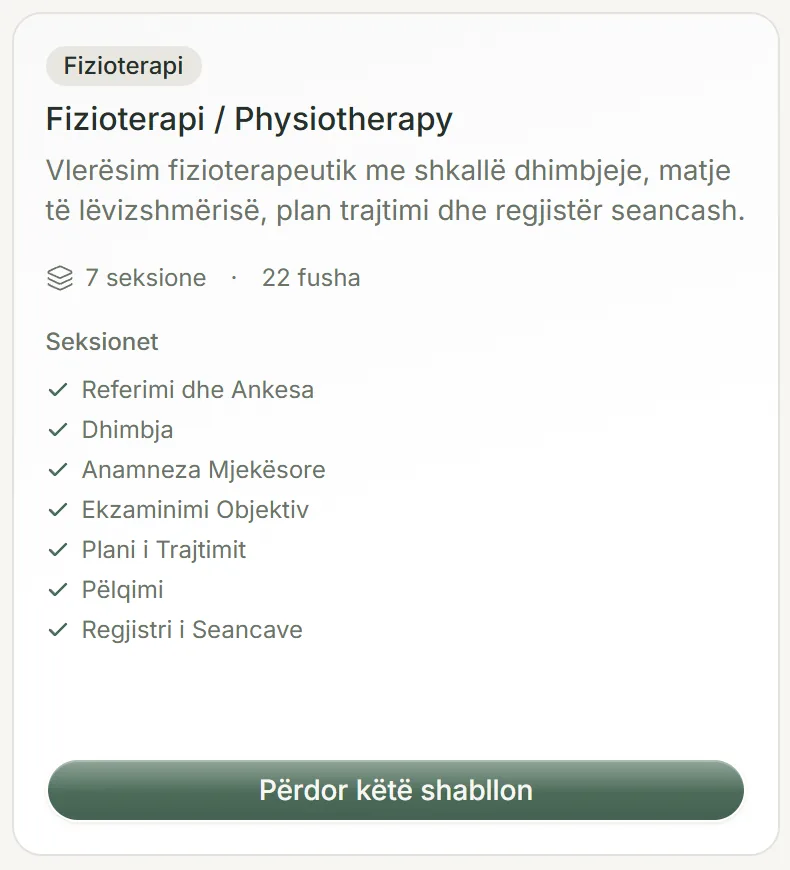
What the physiotherapy record holds
Its seven sections follow a first assessment from start to finish. Above them sit the basic details every record has: name, date of birth, gender and contacts.
- Referral and complaint: who referred the patient, the presenting complaint, when the symptoms began and the mechanism of injury.
- Pain assessment: a VAS score from 0 to 10, the character of the pain and what makes it worse or eases it.
- Medical history: previous surgery, cardiovascular conditions, osteoporosis or previous fractures, pregnancy and current medication.
- Objective examination: a body map, observation and posture, a range of motion and strength table, and special tests.
- Treatment plan: the physiotherapy diagnosis, the goals, the number of planned sessions and a home exercise programme.
- Consent: an informed consent statement, signed by the patient and the physiotherapist.
- Session log: one row for each session given.
Pain and examination, measured
Pain is recorded on the VAS scale, where 0 means no pain and 10 the worst pain imaginable. Its character is picked from a list: sharp, dull, burning, throbbing or shooting. So is the mechanism of injury: acute trauma, chronic overuse, post-surgical, degenerative or unknown.
The range of motion and strength table has a row for each movement: the joint, the movement, active and passive degrees, and strength from 0 to 5. Add as many rows as you need, for one joint or for several.
The body map is an image field: for each patient you upload a sketch or a photo marking the affected area. If you want the same body diagram on every record, to draw on it on screen, set it in the template before the first record uses it. Once the template has records, that field cannot be switched: add a new diagram field instead.
The session log
Each session is a new row in the table: the date, the session number, the treatment given, the VAS score after the session and notes. The pain measured at the first assessment can then be set against the score after every session, in the same record.
The number of planned sessions is written in the treatment plan, next to the log that shows the sessions given. The home exercise programme is written there too, and it prints in the record's PDF.
Sessions in the calendar
Each session is booked as an appointment in the calendar, in the colour of the physiotherapist giving it. Open the patient's record to see the sessions still to come and the ones already given; a missed session is marked as missed.
On the day before a session, the Reminders page shows who is coming and prepares a WhatsApp or email message for each of them, which you send with one tap. If your patients come back for a check-up after 3 months rather than 6, the clinic's interval is changed in settings.
Medical history and consent before treatment
The medical history section is open from the first visit, because previous surgery, heart disease, osteoporosis or pregnancy can rule out a treatment. The pregnancy question is hidden for a male patient.
That question is marked as safety-critical: a "Yes" shows as a warning at the top of the record and on the first page of the PDF.
The patient signs the informed consent on screen, or a signed paper copy is scanned and uploaded. The physiotherapist's signature is saved once and filled in by itself.
PDF, languages and the blank form
The printed record carries the clinic's logo at the top. For each record you choose the language: Albanian with English, Italian, French or Spanish beside it, for a patient who does not read Albanian.
If you would like to see the template on paper before you sign up, download the blank physiotherapy form below, in English or in Albanian, and print it.
Free downloads
Common questions
How can I see whether pain is going down from one session to the next?
Compare the VAS score from the first assessment, in the pain section, with the "VAS after" column in the session log. Both are in the same record.
Does the body map come with a ready-made diagram?
No. In the ready-made template, the body map is a place to upload a sketch or a photo for each patient. If you upload your own diagram to the template before the first record uses it, it appears on every new record and you draw on it on screen. Once the template has records, add a new diagram field for it instead.
Can I book a whole series of sessions at once?
No. Each session is booked as its own appointment in the calendar. The patient's record shows them all together, those coming up and those already given.
Who signs the physiotherapy consent when the patient is a child?
A parent or legal guardian. On the consent, choose who is signing and type their name, then they sign on screen, or you upload the signed paper copy.
Can I add tests to the physiotherapy record that the template does not have?
Yes. Once you add it, the template belongs to your clinic: you can add sections and fields (text, numbers, dates, times, choice lists, yes or no, tables, images or consents) and rename them. A field can be removed only until the first record is opened with the template.
Try it in your clinic
14 days free, with no credit card. To carry on, choose 1, 3, 6 or 12 months and pay once: nothing renews automatically.