Appointment calendar for private clinics
The calendar in Medical Solutions (the Axhenda, on the Albanian pages) holds every doctor's appointments, booked from the reception computer or from a phone, and it is where the clinic's reminders to patients start.
Many clinics still keep appointments in a notebook, in Excel or in WhatsApp chats. What the calendar adds is the link to the patient record: every appointment that takes place counts as a visit, and the next check-up is worked out from the last one.
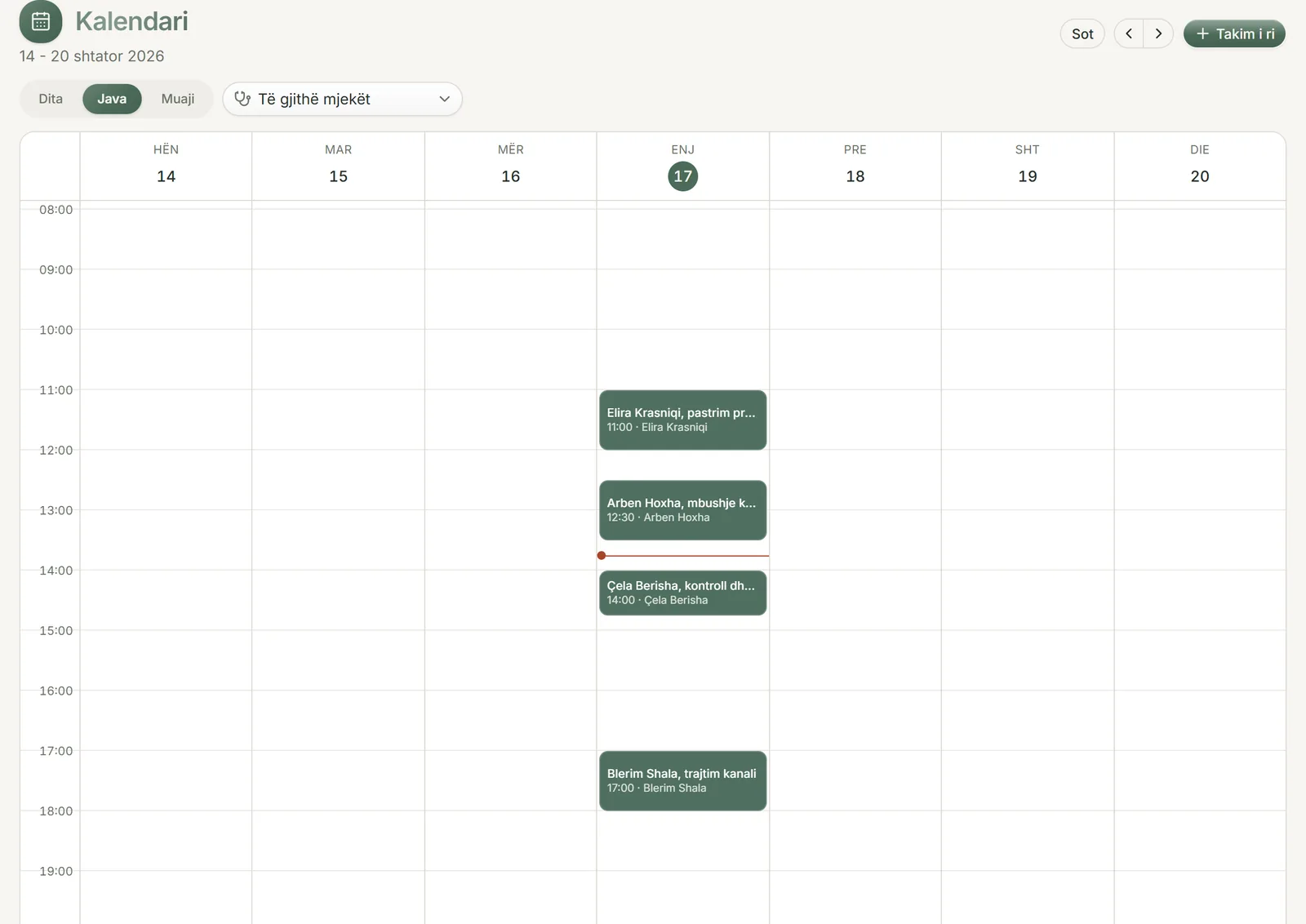
Day, week and month
The calendar opens on the week, and one tap switches to the day or the month. The doctor filter shows one doctor's schedule on its own, or everyone's together.
Each doctor has a colour, and a single appointment can be given a different one. The clinic can add colours of its own too. When two appointments fall at the same time, they sit side by side, so neither hides behind the other.
The day covers all 24 hours and opens at 8 in the morning, so an appointment at 7:30 or at 21:00 is still visible and clickable. On a phone, the week becomes a list of days with full names and times, because seven columns cannot be read on a narrow screen.
How an appointment is booked and moved
Click a free hour and a new appointment opens. Type the patient's name: if they have a record, pick it from the list. If they are new, book them by name alone and add whatever phone, WhatsApp number or email you have.
When you later open a record for the new patient, the appointments booked under their name attach to it by themselves, as long as the phone number matches or nobody else at the clinic has the same name. Otherwise the appointment waits to be linked by hand, so it never lands on the wrong patient.
The appointment's title comes from the clinic's list of services, or you type a treatment that is not on it. To move an appointment, drag it to the new time or day. On a phone, arrows move it a day earlier or later and keep its time.
From appointment to visit
Every appointment has a status: scheduled, confirmed, arrived, completed, cancelled or did not attend. Once its time has passed, an appointment that was not cancelled and that the patient did not miss counts as a visit.
The patient's record lists upcoming and past appointments, and the calendar keeps the date of the last visit up to date by itself. That date is the one the next check-up is counted from.
If you tick the treatments carried out on the appointment, from the list of services, the quote for that visit is already drawn up on the quotes page. Review it, complete it if something is missing, and print it.
A reminder about tomorrow's appointment
On the Reminders page, the Appointments tab shows who is booked for tomorrow. A clinic that books further ahead can widen this list to two or three days.
Each patient has buttons to call, to message on WhatsApp and to email. Choose the language of the message (Albanian, English, Italian, French or Spanish) and it comes ready written, with the patient's name, the day, the time and the clinic's name. Email opens in your mail program with the message in place. For WhatsApp, the message is copied and the chat with the patient opens, so you paste it there.
Nothing goes out on its own: someone at the clinic reads the message and sends it. You can change the wording once in settings, in the language the clinic writes to its patients in.
The 6-month check-up reminder
The clinic sets how many months pass between the last visit and the next check-up, from 1 to 24. It starts at 6. For one particular patient, the doctor can choose a check-up in 3, 6 or 12 months on the appointment.
The Check-ups tab on the Reminders page lists the patients whose check-up is due, with filters for phone, WhatsApp and email. Once you have contacted a patient, you mark them as reminded. If the clinic has added its Google review link, the people who came in last week are listed there as well, so you can ask them for a review.
The clinic can also turn on the automatic check-up email, which starts switched off. It goes out once a day, only to patients who agreed to be contacted by email and whose address was read back to them, and for a child only when a parent or guardian gave the consent. Each patient receives it once per interval. The email never mentions a diagnosis or a treatment, and it always carries an unsubscribe link.
When several people use it at once
Reception and the doctors see the same calendar. If two people change the same appointment at the same moment, the second change is not saved and the calendar shows the latest version, so no change is lost without anyone noticing.
Times are kept on the clinic's clock. Someone who opens the calendar from home sees the same times as reception, and the message to the patient gives the right time for the appointment.
Common questions
Can patients book appointments online themselves?
No. The clinic books appointments, in the calendar. Patients have no account in the software, and there is no booking page for them.
Are SMS or WhatsApp reminders sent automatically before an appointment?
No. The appointment message comes ready written, but a person at the clinic sends it with one tap. The only message that goes out on its own is the check-up email, and only when the clinic has turned it on and the patient has agreed.
How do I book a patient who has no record yet?
Type their name on the appointment and choose to book them as a new patient. Add their phone or email if you have them. When you open their record, the appointment attaches to it.
What happens to the reminder when a patient misses an appointment?
Mark the appointment as "Did not attend". It does not count as a visit, so the check-up is not pushed back and the patient stays on the list of people to remind.
Can one patient have a check-up in 3 months when the clinic uses 6?
Yes. On the patient's appointment, once it is linked to their record, choose a check-up in 3, 6 or 12 months. That patient appears on the check-up list on that date, while everyone else follows the clinic's interval.
Can I block an hour or a whole day in the calendar without a patient?
Yes. An appointment can be saved with no patient, for a meeting for example, and it can take the whole day. Everyone then sees that time as taken.
Try it in your clinic
14 days free, with no credit card. To carry on, choose 1, 3, 6 or 12 months and pay once: nothing renews automatically.